GuiCreateScrollPane
Jump to navigation
Jump to search
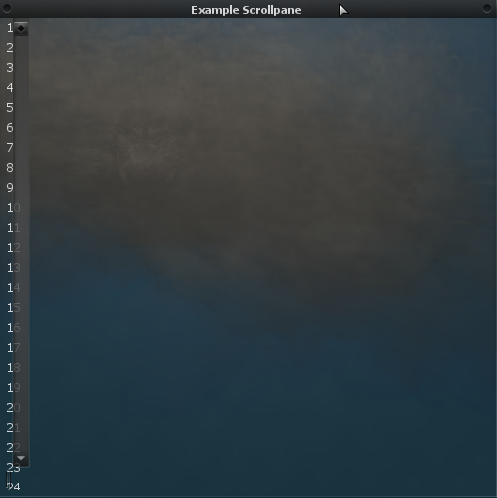
This creates a GUI scroll pane.

Example GUI ScrollPane.
Syntax
element guiCreateScrollPane( float x, float y, float width, float height, [ bool relative = false, gui-element parent = nil])
Required Arguments
- x: the 2D x offset of the GUI scrollpane from its parent. This is affected by the relative argument.
- y: the 2D y offset of the GUI scrollpane from its parent. This is affected by the relative argument.
- width: the width of the GUI scrollpane. This is affected by the relative argument.
- height: the height of the GUI scrollpane. This is affected by the relative argument.
Optional Arguments
NOTE: When using optional arguments, you might need to supply all arguments before the one you wish to use. For more information on optional arguments, see optional arguments.
- relative: whether sizes and positions are relative to their parent's. If this is true, then all measures must be between 0 and 1, representing sizes/positions as a fraction of the parent widget's size.
- parent: the gui-element this scrollpane is attached to. By default, it is nil, meaning the widget is attached to the background.
Returns
The gui-element if created, otherwise false.
Example
This example creates a small window with a scrollpane on. Using the /fill command you can populate the scrollpane with the names of every player in the server.
addEventHandler("onClientResourceStart",resourceRoot,
	function()
		-- create a window and create a scrollpane on it
		local window = guiCreateWindow(5,5,130,150,"",false)
		-- the width and height values here are largely irrelevant as the scrollpane will automatically resize when needed
		scrollpane = guiCreateScrollPane(0,0,130,150,false,window)
	end
)

addCommandHandler("fill",
	function()
		-- if the scrollpane exists
		if scrollpane then
			-- delete all the existing labels
			for i,v in ipairs(getElementChildren(scrollpane)) do
				destroyElement(v)
			end

			-- for every player in the server
			for i,v in ipairs(getElementsByType("player")) do
				-- create a label with their name on the scrollpane
				guiCreateLabel(5,i*20,90,20,tostring(getPlayerName(v)),false,scrollpane)
			end
		end
	end
)
See Also
General functions
- guiBringToFront
- getChatboxLayout
- getChatboxCharacterLimit
- guiCreateFont
- guiBlur
- guiFocus
- guiGetAlpha
- guiGetCursorType
- guiGetEnabled
- guiGetFont
- guiGetInputEnabled
- guiGetInputMode
- guiGetPosition
- guiGetProperties
- guiGetProperty
- guiGetScreenSize
- guiGetSize
- guiGetText
- guiGetVisible
- guiMoveToBack
- guiSetAlpha
- guiSetEnabled
- guiSetFont
- guiSetInputEnabled
- guiSetInputMode
- guiSetPosition
- guiSetProperty
- guiSetSize
- guiSetText
- guiSetVisible
- isChatBoxInputActive
- isConsoleActive
- isDebugViewActive
- isMainMenuActive
- isMTAWindowActive
- isTransferBoxActive
- setChatboxCharacterLimit
- setDebugViewActive
Browsers
Buttons
Checkboxes
Comboboxes
- guiCreateComboBox
- guiComboBoxAddItem
- guiComboBoxClear
- guiComboBoxGetItemCount
- guiComboBoxGetItemText
- guiComboBoxGetSelected
- guiComboBoxIsOpen
- guiComboBoxRemoveItem
- guiComboBoxSetItemText
- guiComboBoxSetOpen
- guiComboBoxSetSelected
Edit Boxes
- guiCreateEdit
- guiEditGetCaretIndex
- guiEditGetMaxLength
- guiEditIsMasked
- guiEditIsReadOnly
- guiEditSetCaretIndex
- guiEditSetMasked
- guiEditSetMaxLength
- guiEditSetReadOnly
Gridlists
- guiCreateGridList
- guiGridListAddColumn
- guiGridListAddRow
- guiGridListAutoSizeColumn
- guiGridListClear
- guiGridListGetColumnCount
- guiGridListGetColumnTitle
- guiGridListGetColumnWidth
- guiGridListGetHorizontalScrollPosition
- guiGridListGetItemColor
- guiGridListGetItemData
- guiGridListGetItemText
- guiGridListGetRowCount
- guiGridListGetSelectedCount
- guiGridListGetSelectedItem
- guiGridListGetSelectedItems
- guiGridListGetSelectionMode
- guiGridListIsSortingEnabled
- guiGridListGetVerticalScrollPosition
- guiGridListInsertRowAfter
- guiGridListRemoveColumn
- guiGridListRemoveRow
- guiGridListSetColumnTitle
- guiGridListSetColumnWidth
- guiGridListSetHorizontalScrollPosition
- guiGridListSetItemColor
- guiGridListSetItemData
- guiGridListSetItemText
- guiGridListSetScrollBars
- guiGridListSetSelectedItem
- guiGridListSetSelectionMode
- guiGridListSetSortingEnabled
- guiGridListSetVerticalScrollPosition
Memos
- guiCreateMemo
- guiMemoGetCaretIndex
- guiMemoGetVerticalScrollPosition
- guiMemoSetVerticalScrollPosition
- guiMemoIsReadOnly
- guiMemoSetCaretIndex
- guiMemoSetReadOnly
Progressbars
Radio Buttons
Scrollbars
Scrollpanes
- guiCreateScrollPane
- guiScrollPaneGetHorizontalScrollPosition
- guiScrollPaneGetVerticalScrollPosition
- guiScrollPaneSetHorizontalScrollPosition
- guiScrollPaneSetScrollBars
- guiScrollPaneSetVerticalScrollPosition
Static Images
Tab Panels
Tabs
Text Labels
- guiCreateLabel
- guiLabelGetColor
- guiLabelGetFontHeight
- guiLabelGetTextExtent
- guiLabelSetColor
- guiLabelSetHorizontalAlign
- guiLabelSetVerticalAlign
Windows
Input
GUI
- onClientGUIAccepted
- onClientGUIBlur
- onClientGUIChanged
- onClientGUIClick
- onClientGUIComboBoxAccepted
- onClientGUIDoubleClick
- onClientGUIFocus
- onClientGUIMouseDown
- onClientGUIMouseUp
- onClientGUIMove
- onClientGUIScroll
- onClientGUISize
- onClientGUITabSwitched
- onClientMouseEnter
- onClientMouseLeave
- onClientMouseMove
- onClientMouseWheel